深度优先

这个家伙好懒,除了文章什么都没留下

0%

转自:https://www.cnblogs.com/dongbeifeng/p/authentication-and-authorization-in-aspnet-web-api.html

定义

身份验证(Authentication):确定用户是谁。

授权(Authorization):确定用户能做什么,不能做什么。

身份验证

WebApi 假定身份验证发生在宿主程序称中。对于 web-hosting,宿主是 IIS。这种情况下使用 HTTP Module 进行验证。

验证时,宿主会创建一个表示安全上下文的主体对象(实现 IPrincipal),将它附加到当前线程。主体对象包含一个存储用户信息的 Identity 对象。若验证成功,Identity.IsAuthenticated 属性将返回 true。

HTTP 消息处理程序(HTTP Message Handler)

可以用 HTTP 消息处理程序代替宿主进行身份验证。这种情况下,由 HTTP 消息处理程序检查请求并设置主体对象。

请考虑以下事项决定是否使用消息处理程序进行身份验证:

  • HTTP 模块检查所有经过 asp.net 管道的请求,消息处理程序只检查路由到 WebAPI的请求。
  • 可以为每个路由单独设置消息处理程序。
  • HTTP 模块仅在 IIS 中可用。消息处理程序则与宿主无关,在 web-hosting 和 self-hosting 中均可用。
  • HTTP 模块参与IIS 日志和审计等功能。
  • HTTP模块在管道之前运行,主体在消息处理程序运行之前不会设置,当响应离开 消息处理程序时,主体会恢复成原来的那个。 一般来说,不需要自承载时,HTTP 模块较好。

设置主体

进行自定义身份验证时,应在两个地方设置主体对象:

  • Thread.CurrentPrincipal,这是 .net 中设置线程主体的标准方式。
  • HttpContext.Current.User 这是特定于 ASP.NET 的属性。
    1
    2
    3
    4
    5
    6
    7
    8
     private void SetPrincipal(IPrincipal principal)
    {
    Thread.CurrentPrincipal = principal;
    if (HttpContext.Current != null)
    {
    HttpContext.Current.User = principal;
    }
    }
    采用 web-hosting 时,必须同时设置两处,避免安全上下文不一致。对于 self-hosting,HttpContext.Current 为 null,所以设置之前应进行检查。

授权

授权发生在管道中更接近 controller 的位置。

  • 授权筛选器(Authorization filter)在 action 之前运行。若请求未授权,返回错误,action 不运行。
  • 在 action 内部,可以用 ApiController.User 属性获取主体对象,做进一步的控制。

[Authorize] 属性

AuthorizeAttribute 是内置的授权筛选器。用户未通过身份验证时,它返回 HTTP 401 状态码。可以在全局,控制和 action 三个级别应用它。

在全局级别应用:

1
2
3
4
 public static void Register(HttpConfiguration config)
{
config.Filters.Add(new AuthorizeAttribute());
}

在控制器级别应用:

1
2
3
4
5
6
 [Authorize]
public class ValuesController : ApiController
{
public HttpResponseMessage Get(int id) { ... }
public HttpResponseMessage Post() { ... }
}

在 Action 级别应用:

1
2
3
4
5
6
7
 public class ValuesController : ApiController
{
public HttpResponseMessage Get() { ... }

[Authorize]
public HttpResponseMessage Post() { ... }
}

在控制器上应用 [Authorize] 时,可以在 Action 上应用 [AllowAnonymous] 取消对某个 Action 的授权要求。上面的代码可以改成下面的形式:

1
2
3
4
5
6
7
8
 [Authorize]
public class ValuesController : ApiController
{
[AllowAnonymous]
public HttpResponseMessage Get() { ... }

public HttpResponseMessage Post() { ... }
}

指定用户和角色进行限制:

1
2
3
4
5
6
7
8
9
10
11
 // 按用户限制访问
[Authorize(Users="Alice,Bob")]
public class ValuesController : ApiController
{
}

// 按角色限制访问
[Authorize(Roles="Administrators")]
public class ValuesController : ApiController
{
}

用于 WebAPI 的 AuthorizeAttribute 位于 System.Web.Http 命名空间。在 System.Web.Mvc 命名空间中有一个同名属性,不可用于 WebAPI。

自定义授权筛选器

可从以下类型派生自定义授权筛选器

  • AuthorizeAttribute,基于用户和角色进行授权。
  • AuthorizationFilterAttribute,不基于用户和角色的同步授权。
  • IAuthorizationFilter,实现此接口执行异步授权逻辑。例如,授权逻辑中有对 IO 或网络的异步调用。(CPU-bound的授权逻辑更适合从 AuthorizationFilterAttribute 派生,这样不必写异步方法)。 下图是 AuthorizeAttribute 类层次

在 Action 中执行验证

可在控制器中检查 ApiController.User 属性,根据用户和角色使用不同的逻辑。

1
2
3
4
5
6
7
 public HttpResponseMessage Get()
{
if (User.IsInRole("Administrators"))
{
// ...
}
}

转自:https://www.cnblogs.com/dukang1991/p/5627584.html

基于令牌的认证

我们知道WEB网站的身份验证一般通过session或者cookie完成的,登录成功后客户端发送的任何请求都带上cookie,服务端根据客户端发送来的cookie来识别用户。

WEB API使用这样的方法不是很适合,于是就有了基于令牌的认证,使用令牌认证有几个好处:可扩展性、松散耦合、移动终端调用比较简单等等,别人都用上了,你还有理由不用吗?

下面我们花个20分钟的时间来实现一个简单的WEB API token认证:

Step 1:安装所需的NuGet包:

打开NuGet包管理器控制台,然后输入如下指令:

1
2
3
4
Install-Package Microsoft.AspNet.WebApi.Owin -Version 5.1.2
Install-Package Microsoft.Owin.Host.SystemWeb -Version 2.1.0
Install-Package Microsoft.AspNet.Identity.Owin -Version 2.0.1
Install-Package Microsoft.Owin.Cors -Version 2.1.0

Step 2 在项目根目录下添加Owin“Startup”类

1
2
3
4
5
6
7
8
9
10
11
12
13
14
15
16
17
18
19
20
21
22
23
24
25
26
27
28
29
30
31
32
33
34
35
36
37
using System;
using System.Web.Http;

using Owin;
using Microsoft.Owin;
using Microsoft.Owin.Security.OAuth;
using SqlSugar.WebApi;

[assembly: OwinStartup(typeof(WebApi.Startup))]
namespace WebApi
{
public class Startup
{
public void Configuration(IAppBuilder app)
{
HttpConfiguration config = new HttpConfiguration();
ConfigureOAuth(app);

WebApiConfig.Register(config);
app.UseCors(Microsoft.Owin.Cors.CorsOptions.AllowAll);
app.UseWebApi(config);
}

public void ConfigureOAuth(IAppBuilder app)
{
OAuthAuthorizationServerOptions OAuthServerOptions = new OAuthAuthorizationServerOptions()
{
AllowInsecureHttp = true,
TokenEndpointPath = new PathString("/token"),
AccessTokenExpireTimeSpan = TimeSpan.FromDays(1),
Provider = new SimpleAuthorizationServerProvider()
};
app.UseOAuthAuthorizationServer(OAuthServerOptions);
app.UseOAuthBearerAuthentication(new OAuthBearerAuthenticationOptions());
}
}
}

Step 3:在项目根目录下添加验证类 SimpleAuthorizationServerProvider,为了简单用户的验证部分我们省略掉;

1
2
3
4
5
6
7
8
9
10
11
12
13
14
15
16
17
18
19
20
21
22
23
24
25
26
27
28
29
30
31
32
33
34
35
36
37
38
39
40
41
42
using System.Threading.Tasks;
using System.Security.Claims;
using Microsoft.Owin.Security.OAuth;

namespace WebApi
{
/// <summary>
/// Token验证
/// </summary>
public class SimpleAuthorizationServerProvider : OAuthAuthorizationServerProvider
{
public override async Task ValidateClientAuthentication(OAuthValidateClientAuthenticationContext context)
{
await Task.Factory.StartNew(() => context.Validated());
}

public override async Task GrantResourceOwnerCredentials(OAuthGrantResourceOwnerCredentialsContext context)
{
await Task.Factory.StartNew(() => context.OwinContext.Response.Headers.Add("Access-Control-Allow-Origin", new[] { "*" }));
/*
* 对用户名、密码进行数据校验
using (AuthRepository _repo = new AuthRepository())
{
IdentityUser user = await _repo.FindUser(context.UserName, context.Password);

if (user == null)
{
context.SetError("invalid_grant", "The user name or password is incorrect.");
return;
}
}*/

var identity = new ClaimsIdentity(context.Options.AuthenticationType);
identity.AddClaim(new Claim("sub", context.UserName));
identity.AddClaim(new Claim("role", "user"));
identity.AddClaim(new Claim(ClaimTypes.Name, user.UserName));

context.Validated(identity);

}
}
}

Step 4:让CORS起作用

在ASP.NET Web API中启用OAuth的Access Token验证非常简单,只需在相应的Controller或Action加上[Authorize]标记

1
2
3
4
5
6
7
[Authorize]
public ActionResult Index()
{
ViewBag.Title = "Home Page";

return View();
}

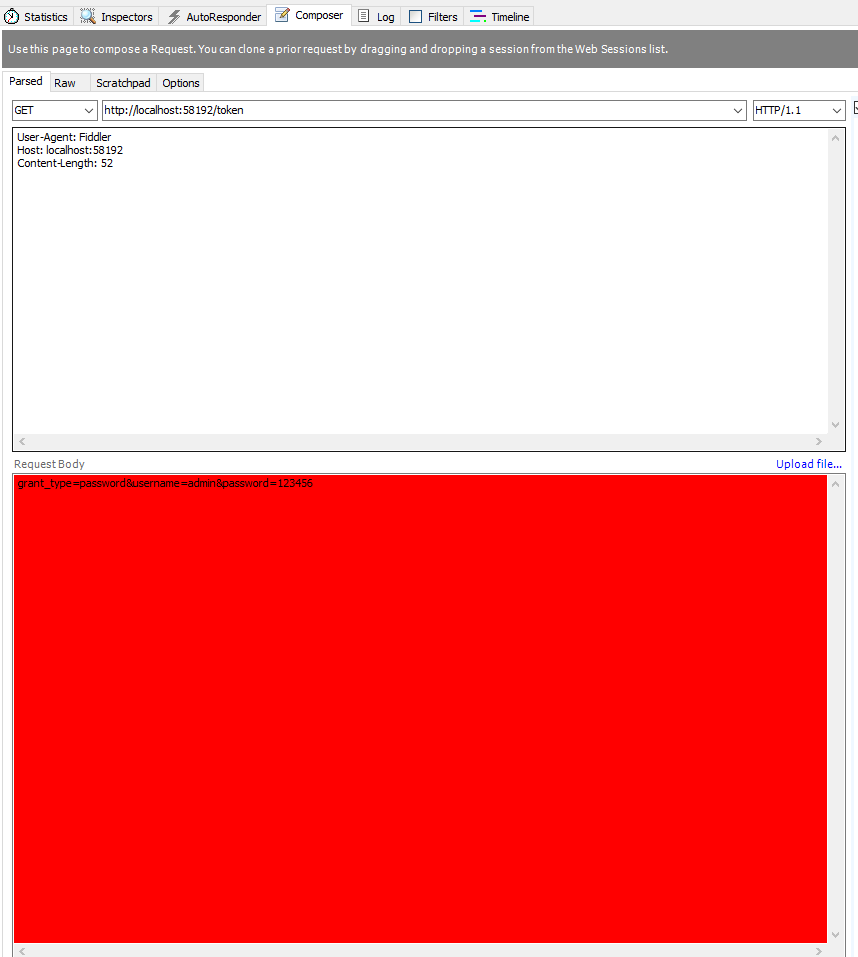
Step 5 : 请求 Token

获取token, POST http://localhost:23477/token

参数BODY x-www-form-urlencoded 格式:

grant_type=password&username=admin&password=123456

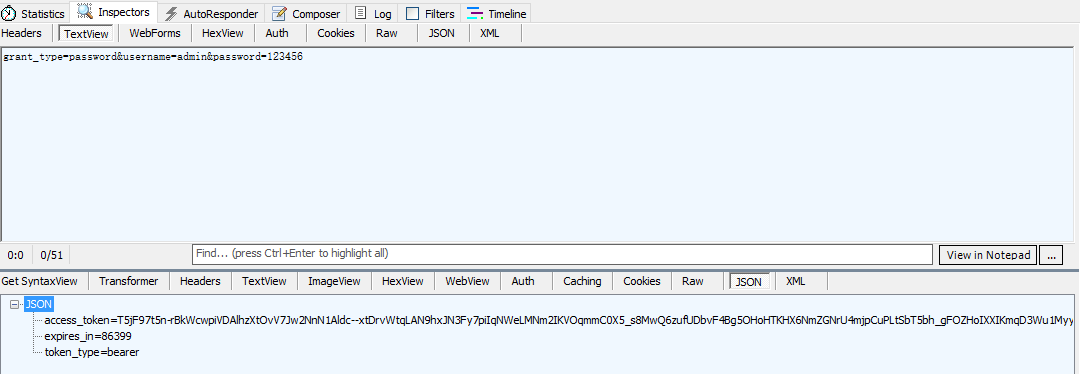
返回状态200 结果为

Step 5 调用api

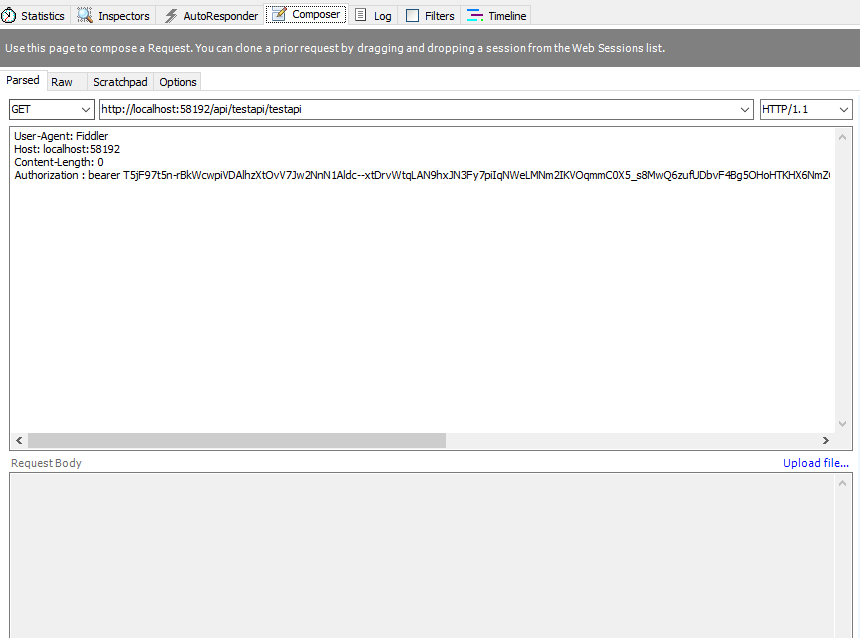
只要在http请求头中加上Authorization:bearer Token就可以成功访问API就成功了:

GET http://localhost:58192/api/testapi/testapi

Authorization : bearer

T5jF97t5n-rBkWcwpiVDAlhzXtOvV7Jw2NnN1Aldc–xtDrvWtqLAN9hxJN3Fy7piIqNWeLMNm2IKVOqmmC0X5_s8MwQ6zufUDbvF4Bg5OHoHTKHX6NmZGNrU4mjpCuPLtSbT5bh_gFOZHoIXXIKmqD3Wu1MyyKKNhj9XPEIkd9bl4E9AZ1wAt4dyUxmPVA_VKuN7UvYJ97TkO04XyGqmXGtfVWKfM75mNVYNhySWTg

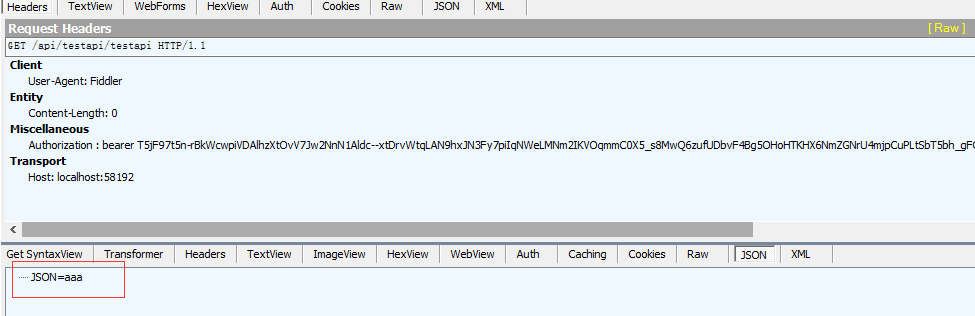
结果为:

转自:https://blog.csdn.net/jimo_lonely/article/details/51711821

这里有很多种方法对List进行排序,本文总结了三种方法,但多种实现。

1.对基础类型排序

方法一:

调用sort方法,如果需要降序,进行反转:

1
2
3
List<int> list = new List<int>();
list.Sort();// 升序排序
list.Reverse();// 反转顺序

方法二:

使用lambda表达式,在前面加个负号就是降序了

1
2
3
List<int> list= new List<int>(){5,1,22,11,4};
list.Sort((x, y) => x.CompareTo(y));//升序
list.Sort((x, y) => -x.CompareTo(y));//降序

接下来是对非基本类型排序,以一个类为例。

2.准备

首先写一个类用于排序,里面有两个属性,一个构造方法,重写了ToString方法:

1
2
3
4
5
6
7
8
9
10
11
12
13
14
15
16
17
18
19
20
21
22
23
24
25
26
27
28
29
30
31
32
33
34
35
36
37
38
39
40
41
42
class People
{
private int _id;
private string _name;

public People(int id,string name)
{
this._id = id;
this.Name = name;
}

public int Id
{
get
{
return _id;
}

set
{
_id = value;
}
}

public string Name
{
get
{
return _name;
}

set
{
_name = value;
}
}
//重写ToString
public override string ToString()
{
return "ID:"+_id+" Name:"+_name;
}
}

然后添加一些随机数据,仍希望用Sort排序

1
2
3
4
5
6
7
8
9
10
11
12
13
14
15
16
17
18
19
20
21
List<People> list = new List<People>();
Random r = new Random();
//添加数据
for(int i = 0; i < 10; i++)
{
int j = r.Next(0, 10);
list.Add(new People(j, "name" + j));
}

Console.WriteLine("排序前:");
foreach(var p in list)
{
Console.WriteLine(p);
}

list.Sort();//排序
Console.WriteLine("排序后:");
foreach (var p in list)
{
Console.WriteLine(p);
}

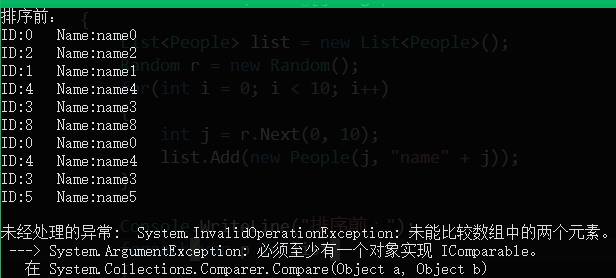
很不幸,前面输出正常,后面抛异常了:

1

查看Sort源码可知它有如下几个重载:

2

第三和第四个差不多。

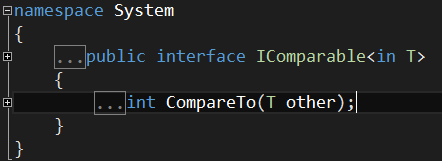
3.实现IComparable接口

4

可以看到它只有一个方法,我们只需要修改类本身

1
2
3
4
5
6
7
8
9
10
11
12
13
14
15
16
17
18
19
20
21
22
23
24
25
26
27
28
29
30
31
32
33
34
35
36
37
38
39
40
41
42
43
44
45
46
47
48
49
50
51
52
53
54
class People: IComparable<People>
{
private int _id;
private string _name;

public People(int id,string name)
{
this._id = id;
this.Name = name;
}

public int Id
{
get
{
return _id;
}

set
{
_id = value;
}
}

public string Name
{
get
{
return _name;
}

set
{
_name = value;
}
}

//重写的CompareTo方法,根据Id排序
public int CompareTo(People other)
{
if (null == other)
{
return 1;//空值比较大,返回1
}
//return this.Id.CompareTo(other.Id);//升序
return other.Id.CompareTo(this.Id);//降序
}

//重写ToString
public override string ToString()
{
return "ID:"+_id+" Name:"+_name;
}
}

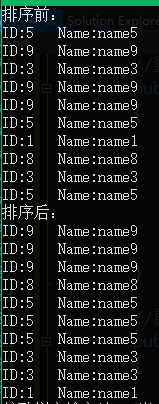
3

4.实现IComparer接口

我们首先来看看这个接口:

1
2
3
4
5
6
7
8
9
10
11
12
13
14
15
public interface IComparer<in T>
{
// Parameters:
// x:
// The first object to compare.
//
// y:
// The second object to compare.
//
// Returns:
// A signed integer that indicates the relative values of x and y, as shown in the
// following table.Value Meaning Less than zerox is less than y.Zerox equals y.Greater
// than zerox is greater than y.
int Compare(T x, T y);
}

重点就看返回值,小于0代表x < y,等于0代表x=y,大于0代表x > y.

下面看一下类的实现,非常简单,一句代码:

1
2
3
4
5
6
7
8
9
10
11
12
13
14
15
16
17
18
19
20
21
22
23
24
25
26
27
28
29
30
31
32
33
34
35
36
37
38
39
40
41
42
43
44
45
46
47
48
49
50
51
52
53
class People:IComparer<People>
{
private int _id;
private string _name;

public People()
{
}

public People(int id,string name)
{
this._id = id;
this.Name = name;
}

public int Id
{
get
{
return _id;
}

set
{
_id = value;
}
}

public string Name
{
get
{
return _name;
}

set
{
_name = value;
}
}

//Compare函数
public int Compare(People x, People y)
{
return x.Id.CompareTo(y.Id);//升序
}

//重写ToString
public override string ToString()
{
return "ID:"+_id+" Name:"+_name;
}
}

但是还没完,我们其实是用了第2点说的第一个重载方法,所以List还需要参数:

1
2
IComparer<People> comparer = new People();
list.Sort(comparer);

5.更简单的

虽然想实现排序上面的接口代码也不多,但有时候只是偶尔排序,并不像修改类,怎么办呢?当然有更简单的方法,委托和lambda表达式:

所以就有了下面的代码,不需要修改类,只需要用委托构造重载而已:

1
2
3
4
5
6
list.Sort(
delegate(People p1,People p2)
{
return p1.Id.CompareTo(p2.Id);//升序
}
);

当然,lambda表达式实现更简单:

1
list.Sort((x,y)=> { return x.Id.CompareTo(y.Id); });

6.OrderBy方法

此方法将排序好的list再赋给原来的list,也可以给其他的。

1
2
list = list.OrderBy(o => o.Id).ToList();//升序
list = list.OrderByDescending(o => o.Id).ToList();//降序

7.多权重排序

排序的方法我就知道这么多了(其实有更多),接下来还有一个问题,如果希望当ID相同时比较Name,上面的代码就需要改改了。

其中,接口IComparable这样写:

1
2
3
4
5
6
7
8
9
10
11
12
13
14
15
16
17
//重写的CompareTo方法,根据Id排序
public int CompareTo(People other)
{
if (null == other)
{
return 1;//空值比较大,返回1
}

//等于返回0
int re = this.Id.CompareTo(other.Id);
if (0 == re)
{
//id相同再比较Name
return this.Name.CompareTo(other.Name);
}
return re;
}

IComparer和delegate还有lambda里可以这样:

1
2
3
4
5
6
7
8
9
 public int Compare(People x, People y)
{
int re = x.Id.CompareTo(y.Id);
if (0 == re)
{
return x.Name.CompareTo(y.Name);
}
return re;
}

OrderBy方法有点不同:

1
2
list = list.OrderBy(o => o.Id).ThenBy(o=>o.Name).ToList();
list = list.OrderByDescending(o => o.Id).ThenByDescending(o=>o.Name).ToList();//降序

8.总结

虽然说了那么多,其实说到底也就三种方法,两个接口和OrderBy方法,lambda表达式只是让形式更简单。